KLM-LOG Blog
Meta Health and Wellness Restrictions: How Telehealth Brands Check Their Pixel and Fix It
· Last updated · Joe Michael, Founder & CTO · 9 min read
The Meta health and wellness restrictions decide what your telehealth pixel is still allowed to tell Meta. If your pixel or dataset has been labeled a health and wellness data source, Meta may strip URLs and custom parameters, block lower-funnel events like Purchase and Lead, or block the domain entirely. The fix isn't to hide what you are. It's to find your restriction level in Events Manager, stop sending health detail Meta was never supposed to get, and rebuild your optimization around events Meta still accepts.
This guide is the version I wish every agency had before onboarding a GLP-1, TRT or hair-loss client: how to check, what each level means, and what holds up.
What are Meta's health and wellness restrictions?
Short answer: they're limits Meta puts on the data a business can share through its pixel and Conversions API when Meta categorizes that business's data source as health and wellness. Depending on the level, Meta removes URL detail and custom parameters, blocks lower-funnel standard events, or blocks events from the domain. They limit what Meta will accept and use from that data source.
Meta told advertisers about the change in mid-November 2024 and rolled the restrictions out from January 2025, according to Succession Media's October 2026 guide. Notices arrived by email and in Ads Manager and Events Manager, per Digital Position's write-up at the time.
- The label sits on the data source, not the ad account. Succession describes it as a label on your data source; Aimerce notes that one pixel can be restricted while another on the same account isn't. So an agency can't assume a client's other brands are clean, or dirty.
- What counts as health and wellness is broad. CustomerLabs' documentation gives examples: medical conditions, provider and patient relationships, weight loss products, prescription drugs and health services. A typical telehealth brand fits several of those.
The four restriction levels
CustomerLabs describes four degrees of restriction. Here's what each one does to a telehealth funnel.
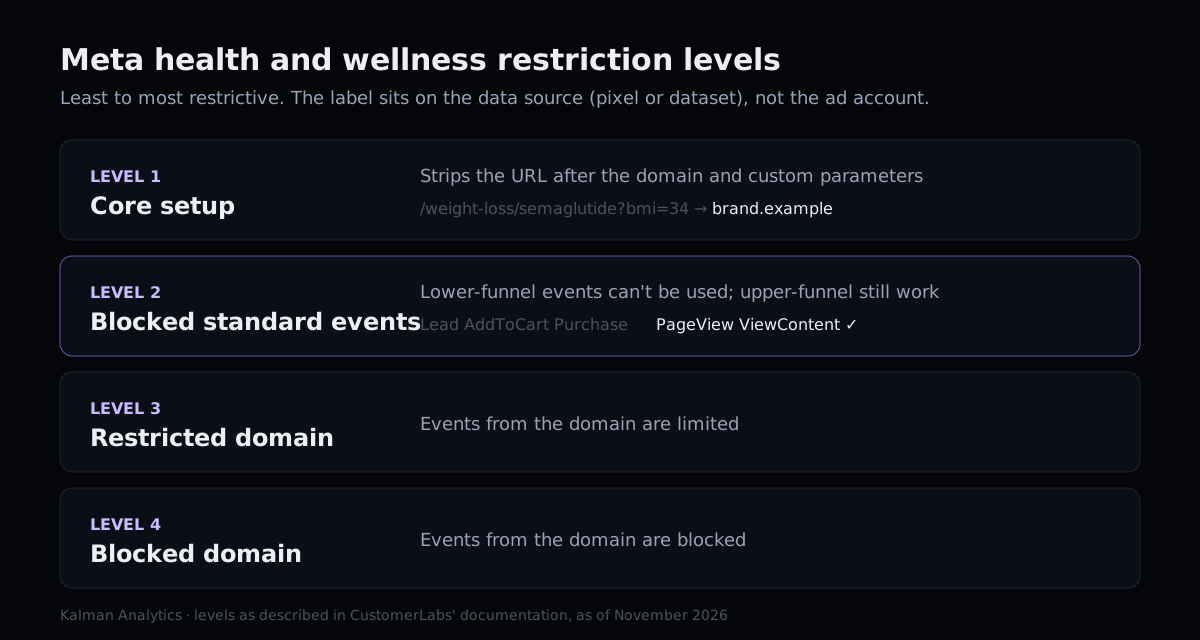
| Level | What Meta does | What it does to a telehealth funnel |
|---|---|---|
| 1. Core setup | Removes everything in the URL after the domain (path, query string, UTMs) and drops custom parameters | Events still arrive, but Meta can't see /semaglutide/ or ?condition=low-t. Custom-parameter reporting goes blank. |
| 2. Blocked standard events | Blocks lower-funnel standard events such as Lead, AddToCart and Purchase; PageView and ViewContent still work | Campaigns can't optimize on the events closest to a patient. This is where performance usually drops. |
| 3. Restricted domain | Limits events from the domain | Fewer events usable for optimization and measurement. |
| 4. Blocked domain | Blocks events from the domain | Nothing from the site reaches Meta for optimization. |
Meta publishes no list of which events get blocked, Succession notes, and if Meta applied core setup, you can't switch it off yourself.
How to check your restriction level in Events Manager
Short answer: in Events Manager, open the dataset (pixel), go to Settings, and check three places: the data restrictions or core setup notice, "Manage event blocking", and "Manage data source categories". Then compare what you think you're sending with what Meta actually receives.
Step by step, for each client dataset:
- Open Events Manager and select the dataset. If the client has more than one pixel, do every one. The label is per data source.
- Settings > Data restrictions > Core setup. A core setup notice means level 1 at least. Note whether you or Meta turned it on.
- Settings > Manage event blocking > Review. Write down every event listed as blocked. This is your level 2 list.
- Settings > Manage data source categories > Manage. This shows the category Meta assigned. View details is where a review can be requested.
- Overview tab. Sort events by volume and look at the last 7 days. An event with steady volume that Ads Manager won't let you select for optimization may be blocked; confirm it in Manage event blocking.
- Ads Manager notifications and the client's inbox. Meta sends notices there too. Ask the client to forward anything from Meta about "health and wellness" or "data restrictions".
CustomerLabs documents the same three Settings locations. The next step decides how much trouble you're in.
Then: check what you're sending, not just what Meta allows
The restriction tells you what Meta will use. It doesn't tell you what your site still sends. For a telehealth brand, that second list is the one with legal exposure.
Open the site in a private window, open the browser's network tab, filter for facebook, and walk the funnel: home, condition page, quiz, checkout. For each request, look at:
dl(page URL) andrl(referrer): do they contain a condition, a drug name or a quiz answer?cd[...]custom data: product names, dosage, plan names like "TRT starter".- Event names: custom events such as
QuizComplete_EDname the condition by themselves. - Advanced Matching fields: hashed email or phone attached to a page that names a condition.
Core setup removes some of this on Meta's side after it arrives. It doesn't stop it leaving the browser, and it doesn't cover the other trackers on the page. Goodwin's September 2026 analysis of web tracking enforcement is a useful read on how regulators approach health data disclosed through tracking, beyond HIPAA. For the HIPAA side, see is the Meta Pixel HIPAA compliant?
What core setup does to a real telehealth event
Here's a simplified PageView from a GLP-1 quiz step, before and after core setup. The identifiers are made up; the shape is typical of what we see.
Sent by the browser
  event:     PageView
  dl:        https://brand.example/weight-loss/semaglutide/quiz?step=3&bmi=34
  rl:        https://brand.example/weight-loss/semaglutide/
  cd[plan]:  GLP-1 Starter

What Meta keeps under core setup
  event:     PageView
  dl:        https://brand.example
  rl:        https://brand.example
  (custom parameters removed)
Two things to take from this. First, the "after" column is still a PageView from a weight-loss brand, so core setup isn't a privacy fix for you; it's Meta limiting its own use of the data. Second, the "before" column is what your site actually transmitted. If your client's legal team asks what went to Meta, the honest answer is the left side. For a GLP-1 client, this field-by-field guide covers the other places the drug and dose show up: UTMs, checkout line items and refills.
Why the fixes most guides suggest don't last
Search for how to fix Meta health and wellness restrictions and you'll find the same handful of tactics. Here's how they hold up.
| Tactic | What happens |
|---|---|
| Rename Purchase to a custom event | Same value, same domain, same timing. Succession rates it high risk and says renamed events run against Meta's Business Tools terms. Our breakdown. |
| New pixel, domain or business portfolio | Rated high risk by the same guide. The new data source describes the same business and can be categorized the same way. |
| Move everything to the Conversions API | Server-side doesn't override Meta's category rules, as Aimerce puts it. It also doesn't change what's in the payload. More on CAPI. |
| Strip the URL and rename the slugs | Helps what you send. Doesn't change the category, and slugs without the condition name are worth doing for their own sake. |
| Hire a vendor that promises to remove the label | Succession warns against these. The category describes your business; nobody can promise Meta will change it. |
Disguising a health business is fragile. Sending less, and sending better, lasts.
How to fix it compliantly
Short answer: accept the category, clean the payload, and move optimization to an accepted event that still predicts a paying patient. Request a review only if the label is genuinely wrong. For most telehealth brands the work is in signal design, not appeals.
1. Decide whether a review is worth it
You can request a review from Manage data source categories, then View details. Meta emails its decision and publishes no timeline, per Succession; CustomerLabs says reviews can take several weeks and approval isn't assured. If the brand sells prescriptions after a clinical consult, the label is accurate and a review is unlikely to change it. A review makes sense for a brand that sells, say, apparel and got caught by a blog post about recovery.
2. Clean what leaves the site
Do this whatever the restriction level:
- Remove the pixel from intake, quiz answers, patient portal and anything behind login.
- Rewrite URLs and page titles that name a condition or drug, or keep those pages tracker-free.
- Delete custom parameters that describe the treatment (product, dosage, plan name).
- Turn off Advanced Matching on any page whose URL or title reveals a condition.
- Replace custom events that name a condition with neutral ones, or remove them.
3. Rebuild optimization on an accepted event
With Purchase blocked, pick the replacement on purpose. We score candidates on whether Meta accepts the event, whether there are about 50 a week per ad set, how close it is to revenue and what it reveals. In most telehealth funnels the best answer is a provider-approved event sent server-side with a neutral name and a business value. The full method is in the signal ladder post.
4. Send server-side through an allowlist
Server-side sending is worth doing for control, not to escape the category. Build the payload from an explicit list of allowed fields (event name, value, currency, hashed identifiers, the site root as the URL) and drop everything else. Review that list with the client's counsel and keep a log of what was sent.
5. Re-check after every site change
A new landing page, quiz step or CMS plugin can put a condition back in a URL in an afternoon. Rescan before each big spend change. Our Black Friday tracking check is a good pre-flight list.
A checklist for agencies with several telehealth clients
| Check | Where | Pass if |
|---|---|---|
| Category and level for every dataset | Events Manager, Settings | Written down per client, with date |
| Blocked events list | Manage event blocking | No active campaign optimizing on a blocked event |
| URLs and titles | Network tab or a scan | No condition or drug names sent to any tracker |
| Custom parameters | Network tab | Nothing describing the treatment |
| Advanced Matching | Pixel settings | Off on condition pages |
| Optimization event | Ads Manager | Accepted, about 50 a week per ad set, close to revenue |
| Server payload | CAPI setup | Built from an allowlist, logged |
| Review status | Manage data source categories | Requested only where the label is wrong |
Why this matters beyond Meta
Meta's restrictions limit what Meta will use. They don't decide whether sharing the data was allowed in the first place. The FTC's July 2026 action against Hims & Hers alleges that the company shared health information with advertising platforms. Those are allegations, and the company has moved to dismiss. But it shows why "Meta strips it anyway" isn't a defense your client should rely on.
Where Kalman fits
Kalman is built for exactly this account: a telehealth brand in the health and wellness category that still needs Meta to find patients. It connects to the telehealth stack (Stripe directly, and platforms like Sylaris OS, Bask Health, Telegra and MDI), turns outcomes like provider approval into a neutral event with a business value, and sends it server-side through an allowlist firewall: if a field isn't explicitly allowed, it doesn't leave. You see exactly what we send, and we sign a BAA with every customer.
If you want to know what a client's site sends Meta today, start with the free scan. It checks up to 15 public pages and shows every tracker, what each one receives and which page addresses or titles name a condition or medication. When you're ready to fix the signal, see pricing.
This post is general information, not legal advice.
Frequently asked questions
How do I know if Meta restricted my pixel for health and wellness?
Open Events Manager, pick the dataset and go to Settings. Look for a data restrictions or core setup notice, a "Manage event blocking" section listing blocked events, and the category under "Manage data source categories". Meta also sends notices by email and in Ads Manager.
Does the Conversions API change Meta's health and wellness restrictions?
No. The category is attached to the data source, and server events are subject to it the same as browser events. Moving to the Conversions API changes who sends the data, not what Meta will accept. More in our post on CAPI for telehealth.
Will a new pixel or domain remove the restriction?
Treat that as high risk. Industry guides rate new pixels, domains and business portfolios as high risk and say these tactics run against Meta's Business Tools terms. Fix what the data source sends instead.
Can I appeal Meta's health and wellness category?
You can request a review from Manage data source categories in Events Manager. Meta emails its decision and publishes no timeline; CustomerLabs says it can take several weeks, and Meta can say no. A legitimate telehealth brand usually belongs in the category, so plan around it.
What should a telehealth account optimize for when Purchase is blocked?
Pick the closest accepted event to a real patient that has enough weekly volume, often a provider-approved event sent server-side with a neutral name and a business value. See the signal ladder.
Is it OK to rename my blocked Purchase event?
No. A renamed event carries the same value, domain and timing, and guides that track this rate it high risk. Here's why renaming fails.
Sources
Free scan
Scan your telehealth site free.
See what your site sends to ad platforms today, and what to fix first. Ready to fix it? See pricing.
Scan your site free