KLM-LOG Blog
Purchase Is Blocked. What Should a Telehealth Account Optimize For?
· Last updated · Joe Michael, Founder & CTO · 5 min read
Open Events Manager on a restricted telehealth account and you'll often find Purchase, Lead and AddToCart sitting under "Blocked." Campaigns can't optimize on them anymore. What usually happens next isn't a decision. Someone picks whatever event is still available, the ad sets go back into learning, and three weeks later everyone is arguing about whether Meta "stopped working."
Picking the replacement event is the most important call in a restricted account. It decides who Meta goes looking for. So make it on purpose, with numbers, before Black Friday budgets go up.
Here's the method I use.
Four tests for any candidate event
Every event you could optimize on has to pass four tests. Most fail at least one.
1. Will Meta accept it? Restrictions come in levels. At the lightest, Meta strips URL detail and custom parameters but standard events still work. At the next level, standard events like Purchase, Lead and AddToCart are blocked and can't be used for optimization, while upper-funnel events like PageView and ViewContent still work. The restrictions apply to the Pixel and the Conversions API alike, so moving a blocked event server-side doesn't change its status.
2. Is there enough of it? Meta's guidance is that an ad set needs about 50 optimization events in a 7-day period to exit the learning phase, counted per ad set. An event that's perfect in theory but fires 20 times a week per ad set will keep that ad set in learning.
3. How close is it to revenue? The further an event sits from a paying patient, the more Meta optimizes for people who click, browse and start forms, which is not the same group as people who get approved and pay.
4. What does it reveal? The name is the least of it. Look at the page URL it fires from, the parameters attached and what the timing gives away. Goodwin's September analysis makes the same point about generic labels: an event called something bland can still reveal health information.
There's a fifth test that only applies to backend events: timing. The Conversions API accepts an event_time up to 7 days in the past. If any event in a request is older than that, Meta rejects the entire request. An outcome that usually lands on day nine can't be your optimization event, however good it is.
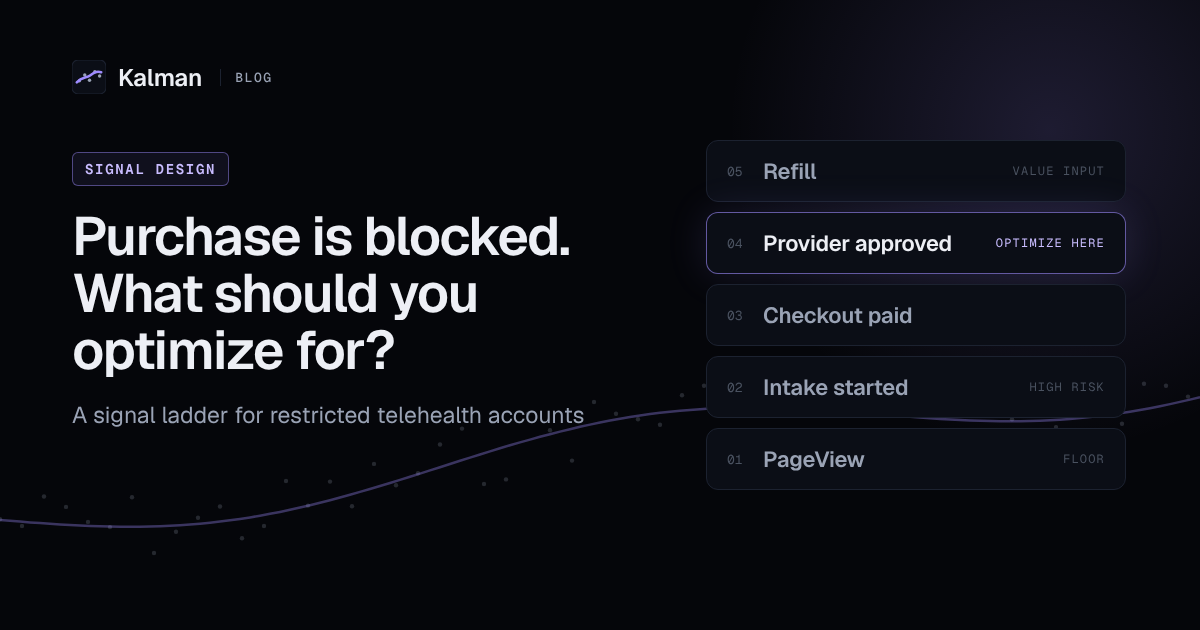
The ladder
Here's how the usual telehealth funnel events score. Your client's names will differ; the shape won't.
Rung 1: PageView and ViewContent. Accepted almost everywhere and high volume. Also the furthest from revenue. Optimizing here finds people who like to click. It's a floor, not a strategy. And watch the URL: an event firing on /weight-loss/ reveals the condition through the path, even under a generic name.
Rung 2: Intake started or lead. Often blocked as a standard event. As a custom event it's high risk: intake pages are where condition answers live, and anything that fires mid-quiz is close to them. It also brings back the old problem of optimizing on form fills, which attracts people who never finish.
Rung 3: Checkout paid. Close to revenue and usually decent volume. But in telehealth, paid isn't a patient yet. A provider still has to approve the order, and some won't be. If your approval rate varies by campaign, Meta is learning from noise you can see and it can't.
Rung 4: Provider approved. The closest thing to a real patient that happens fast enough to send. It's lower volume than checkout and it lags, so it needs the volume and timing tests more than anything else on the ladder. Sent with a neutral name (we use "Qualified") and a business value, it tells Meta who becomes a patient without telling it why.
Rung 5: Refill or retained. The best signal of what a patient is worth, and usually too late to be an event. Use it as an input to the value you send on rung 4, not as the thing Meta optimizes toward.
How to choose, with your own numbers
You can do this in an afternoon with the client's backend data. No guessing.
- List what's still accepted. In Events Manager, write down every event and its status. Anything under "Blocked" is off the table for optimization. If you're not sure which restriction level the account is at, start with our guide to Meta's health and wellness restrictions.
- Pull four weeks of backend counts by stage: checkouts paid, provider approvals, first refills. Use the order system, not Ads Manager.
- Measure the lag. For provider approvals, find how long they usually take after the click. If most land well inside 7 days, rung 4 is viable. If a large share land after, rung 4 will undercount and you'll lose the late ones entirely. How to send each stage without hitting that limit is in our telehealth conversion tracking guide.
- Do the division. Weekly approvals divided by the number of ad sets you plan to run. If that's around 50 or more, optimize on approvals. If it isn't, consolidate ad sets first. Only step down to checkout paid if consolidation still doesn't get you there.
- Attach a value that describes the business, not the treatment. A projected value based on how approved patients actually renew is more useful to Meta than a single list price, and it doesn't hand Meta the price of a specific medication.
- Write out the payload. Event name, value, currency, hashed identifiers, the site root as the source URL. If anything else is in it, take it out or justify it to the client's legal team.
- Change one thing, before the sale. Switch the optimization event, let it settle, then raise budget. Switching mid-sale puts every ad set back into learning during the week it matters most.
If you're tempted to keep Purchase alive by renaming it, I covered why that's fragile in a separate post.
A note on Black Friday
The ladder matters more when spend jumps. Higher budgets on a rung-1 event buy more of the wrong people faster. If you only have time for one change before the sale, move the account up at least one rung and consolidate ad sets so each one can clear learning.
Where Kalman fits
This is the problem Kalman was built around. It connects to the telehealth stack (Stripe directly; Sylaris OS, Bask, Telegra, MDI and others through webhooks), turns real outcomes like provider approval into a neutral Qualified event with a value, and sends it server-side through an allowlist firewall: if a field isn't explicitly allowed, it doesn't leave. You preview the exact payload before anything is sent, and every event Kalman sends is logged.
If you're not sure what the site is sending Meta today, start there. The free scan takes about a minute and shows every tracker and which pages give away a condition.
This post is general information, not legal advice.
Sources
Free scan
Scan your telehealth site free.
See what your site sends to ad platforms today, and what to fix first. Ready to fix it? See pricing.
Scan your site free