KLM-LOG Blog
Telehealth Conversion Tracking: Intake, Payment, Rx Approval and Refills
· Last updated · Joe Michael, Founder & CTO · 13 min read
Telehealth conversion tracking is the job of getting the moments that make you money (a finished intake, a paid order, a provider approval, a refill) back to the ad platforms that drove them. The hard part isn't the tag. It's that most of those moments happen after the patient has left your site, on systems the browser never sees, and some of them carry health information that must never reach Meta.
This guide goes stage by stage: when each conversion happens, which system knows about it, what to send and what to keep home. It also covers the Conversions API timing rule that quietly drops approvals in a lot of telehealth setups.
What is telehealth conversion tracking?
Short answer: it's recording each step from ad click to paying patient, and sending the steps that matter to ad platforms as conversions, so their algorithms can find more people who become patients. In telehealth, that means server events from your platform and payment processor, not just a browser pixel, and none of them can carry health details.
In ecommerce, the conversion is a checkout, and the checkout happens in the browser while the pixel is watching. In telehealth the money arrives in pieces:
- Intake happens on your site, often behind a login.
- First payment happens at checkout, sometimes as an authorization that's only captured after approval.
- Provider approval happens on the telehealth platform, later, without the patient on the page.
- Refills and renewals happen weeks or months later, as subscription charges.
A pixel can see the first one or two. The two that tell Meta who actually became a patient, approval and refill, are invisible to it. That's why so many telehealth accounts end up optimizing on a form fill: it's the last thing the browser saw.
Why ecommerce tracking breaks in telehealth
Short answer: three things break it. The valuable events happen off-site and late, the pages where they start are often the ones that shouldn't carry a pixel at all, and Meta's health and wellness rules restrict what the pixel can use on health sites anyway.
The events are late. The click is day 0. Intake might finish the same day. Approval can take hours or days, depending on the platform's provider queue. The first refill is weeks out. A browser tag only exists while the page is open.
The pages are sensitive. HHS's guidance on online tracking technologies says tracking on logged-in pages, like patient portals and telehealth platforms, generally has access to protected health information, and that a vendor receiving it needs a business associate agreement. Intake forms are exactly that kind of page. (Part of that guidance about public pages was vacated in 2024; we cover what's left in our Meta Pixel and HIPAA explainer.)
Meta restricts the pixel anyway. If your domain has been categorized under Meta's health and wellness rules, lower-funnel events may already be blocked from optimization. How to check your restriction level walks through Events Manager.
So the fix isn't a better pixel. It's sending the right outcomes from the systems that record them, server-side, with nothing health-related attached.
The four conversions that matter
Here's the whole funnel on one page. The Meta event column is a sensible default, not a rule; what matters is that each one is neutral and carries a business value.
| Stage | When it happens | Which system knows | Send to Meta as | Value |
|---|---|---|---|---|
| Intake completed | Minutes after the click | Your site or intake tool | Lead (server-side) |
None, or a small fixed value |
| First payment | At checkout, or when an authorization is captured | Stripe or the platform's billing | Purchase |
The amount charged |
| Provider approval | Hours to days later | The telehealth platform | A neutral custom event, e.g. Qualified |
Projected lifetime value |
| Refill or renewal paid | Weeks to months later | Stripe or the platform's subscriptions | Its own event, e.g. Repeat |
The amount charged |
| Declined, refunded, canceled | Any time | Platform, Stripe | Nothing | Keep for reporting |
Only the first two can happen while the patient is on your site, so a pixel can see them at best. The rest has to come from the server.
Two things in that table do most of the work.
The approval is the best signal you have. A paid order can still be declined by the provider. An approval means a clinician agreed to treat, which is much closer to "this click became a patient" than any form fill. If your weekly approval volume is high enough, it's often the best thing to optimize on. The signal ladder shows how to decide, using Meta's guidance that an ad set needs about 50 optimization events in a week to leave learning.
Event names have to be neutral. Qualified says nothing about a condition. GLP1_Approved or TRT_Rx_Approved says a lot, and Meta has said it filters custom events that look potentially sensitive. In a restricted dataset, a new custom event also has to be registered in Events Manager and reviewed before Meta will use it, so plan for that before launch day. Renaming a blocked event explains why clever names aren't the answer either. For weight-loss brands, our GLP-1 telehealth ads tracking guide goes field by field through the places a GLP-1 funnel leaks, from UTMs to dose-step refills.
Stage 1: intake
Short answer: count that an intake was completed, never what was in it. Send a server-side Lead with hashed contact details and nothing else. Keep the pixel off intake pages, because the answers on those pages (symptoms, medications, weight, history) are the health details you don't want any ad platform near.
What to check today:
- Where the pixel loads. If it fires on intake steps or anything behind login, take it off. A free scan of your site shows which trackers load on your public pages and what each one receives.
- What the confirmation page URL says.
/thank-you?plan=semaglutide&step=7sends the drug and the step to every tag on the page. Use neutral paths. - Where the lead event comes from. Send it from the intake tool's webhook or your server when the form is submitted, not from a browser tag on the form.
Stage 2: first payment
Short answer: send a Purchase with the amount and currency when the charge is captured, and nothing that names the product. If your platform authorizes a card at checkout and captures it after approval, decide which moment you count and stick to it.
The common leak here is product data. Checkout tags love to send content_name, content_ids and line items, and in telehealth the product is the treatment. A Purchase event with an amount is useful. A Purchase event that says which medication the amount paid for is the problem.
The authorization question matters more than it looks. If you count Purchase at authorization, you'll count orders the provider later declines, and Meta will learn from them. If you count at capture, Purchase and approval may land close together. Either works; mixing them across products or brands doesn't.
Stage 3: provider approval
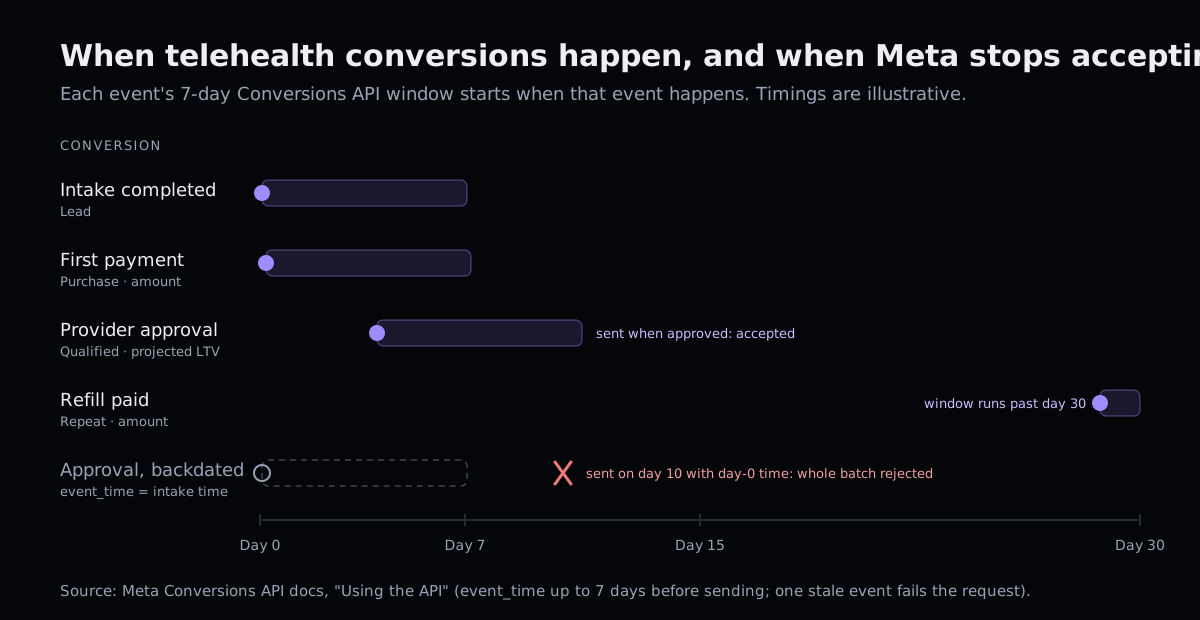
Short answer: send it from the platform when the clinician approves, as a neutral event with a projected lifetime value, timestamped with the time of approval. And watch Meta's timing rule: an event older than 7 days gets the whole request rejected.
This is the stage where most setups fail, and they usually fail silently.
Meta's 7-day rule
Meta's Conversions API docs say event_time can be up to 7 days before you send the event. The same page adds the part that hurts: if any event_time in a request is more than 7 days in the past, Meta returns an error for the entire request and processes none of the events in it.
Here's how that bites a telehealth account:
- Someone sets
event_timeto the intake time, reasoning that "the conversion started then." - Most approvals arrive within a day or two, so it works in testing.
- A provider backlog pushes some approvals past day 7. Those events are now "too old."
- They go out in a batch with fresh approvals. Meta rejects the batch. Nobody looks at the error.
- The account loses its best signal exactly when volume is up.
The fixes are simple:
- Use the time the approval happened as
event_time. It's an event in its own right, not a late copy of the intake. - Send approvals as they happen, from the platform's webhook, not in a nightly or weekly backfill.
- Never mix backfill with live events in one request, and log every rejected request somewhere a person reads.
What about the longer window? Meta's offline events docs give 62 days, but that's for events sent with action_source set to physical_store: offline and in-store transactions. A telehealth approval that started with a website click isn't an in-store sale, and labeling it as one to stretch the window misdescribes your data to Meta. We wouldn't.
What value to send
An approval isn't revenue yet, so what's it worth? The cleanest answer is the product's projected lifetime value: what an approved patient on that plan is typically worth to you over time. That tells Meta an approval for a 12-month plan matters more than one for a single fill, without saying what either plan treats. Keep the number honest and update it when your retention data changes.
Stage 4: refills and renewals
Short answer: send each paid refill or renewal as its own event with the amount, not as another Purchase. Keep cancellations and refunds in your own records. That way new-patient optimization stays clean, and you still get the repeat revenue into value reporting.
If you optimize on Purchase to find new patients and every refill also fires Purchase, you're telling Meta that the people to find look like your existing subscribers, whose refills have nothing to do with this week's ads. It also inflates reported return on ad spend: the refill gets attributed to whatever ad that patient last clicked inside the window.
A separate event fixes both. You can still look at it, report on it, and use it for value, but it doesn't steer new-patient campaigns unless you choose to.
Before and after: an approval event
This is what a platform webhook for an approval might look like when it arrives. The brand is fictional, the shape is typical:
{
  "type": "order.approved",
  "order_id": "ord_8F2K91",
  "approved_at": "2026-11-04T16:12:09Z",
  "patient": { "email": "[email protected]", "phone": "+13035550142", "dob": "1984-02-11" },
  "product": { "name": "Semaglutide 0.25mg starter, 3 months", "sku": "SEMA-025-3M" },
  "intake": { "bmi": 34.1, "conditions": ["prediabetes"] },
  "provider": "Dr. A. Patel",
  "landing_url": "https://northwindhealth.com/weight-loss/semaglutide/quiz?step=7",
  "fbc": "fb.1.1793784600000.IwAR2xyz",
  "amount": 289.00
}
Forward that as-is and Meta gets the drug, the dose, a condition, a BMI and a URL that names the treatment. Here's the same approval, built from an allowlist:
{
  "event_name": "Qualified",
  "event_time": 1793808729,
  "event_id": "ord_8F2K91-approved",
  "action_source": "website",
  "event_source_url": "https://northwindhealth.com/",
  "user_data": {
    "em": ["a1f9…e07c"],
    "ph": ["5c3b…91d2"],
    "fbc": "fb.1.1793784600000.IwAR2xyz"
  },
  "custom_data": { "value": 1840.00, "currency": "USD" }
}
What changed:
| Field | Sent? | Why |
|---|---|---|
| Event name | Neutral Qualified |
Says a clinician approved, not for what |
| Time | Approval time | Inside the 7-day window, with no backdating |
| Event ID | Order ID plus stage | Unique per conversion, so retries don't double count |
| URL | Root only | Paths and query strings name treatments |
| Email, phone | SHA-256 hashed | For matching, never in plain text |
| Click ID | Yes | Ties the approval to the ad |
| Value | Projected lifetime value | Business value, no product |
| Product, dose, intake answers, date of birth, provider | Never | Health details have no business in an ad platform |
The rule underneath: build the outbound event by copying approved fields, not by deleting bad ones. A blocklist misses the field someone adds next month. We go deeper on that in Does moving to CAPI make telehealth tracking safe?
Deduplication: count each conversion once
Short answer: give every conversion one stable event_id, and if the same event is sent from the browser and the server, use the same ID and event name in both. Meta deduplicates on that pair. Events that only exist on the server, like approvals, still need IDs, so retries don't count twice.
Meta's deduplication docs match browser and server events on event_name plus event_id within 48 hours. In a telehealth setup:
- Lead and Purchase might exist in both places during a migration. Use the same ID on both, then retire the browser copy from sensitive pages.
- Approval and refill only exist server-side. Build the ID from the order or subscription ID plus the stage (
ord_8F2K91-approved,sub_44A-renewal-3), so a webhook that fires twice still counts once.
Reconciling Meta, your platform and Stripe
Short answer: they'll never match exactly, because they count different things. Meta counts attributed events inside an attribution window, your platform counts orders and approvals, Stripe counts charges and refunds. Reconcile each week against your own event log, and investigate the gap only when it moves.
A simple weekly sheet:
| Row | Where it comes from | What a gap usually means |
|---|---|---|
| Approvals recorded | Telehealth platform | Baseline |
| Approval events sent | Your event log | Lower than recorded: webhook failures |
| Approval events accepted | Meta's response or Events Manager | Lower than sent: rejected requests (check the 7-day rule) |
| Approvals attributed | Ads Manager | Lower than accepted: normal; not every patient came from Meta |
| Charges, net of refunds | Stripe | Lower than Purchase count: refunds, or Purchase counted at authorization |
The row that catches real problems is "sent vs. accepted." If you can't see that number, you can't tell a tracking bug from a bad week.
A 15-minute telehealth tracking audit
Run this on any telehealth account before you change budgets:
| Step | Where | What you're looking for |
|---|---|---|
| 1. List what's optimizing | Ads Manager, each ad set | Which event, and whether it's the deepest one you have volume for |
| 2. Find where each conversion comes from | Events Manager, Overview | Browser, server, or both; approvals and refills should be server |
| 3. Check where the pixel loads | The free scan, tag manager | Intake steps, login, portal, confirmation pages with treatment URLs |
| 4. Read one server event | Events Manager, Test Events | Event name, URL, custom data: nothing names a condition or product |
5. Check event_time |
Your server code or vendor settings | Each event's own time, not the intake time |
6. Check event_id |
Same | Stable and unique per conversion and stage |
| 7. Look for rejected requests | Server logs or vendor log | Any errors at all, especially on approval batches |
| 8. Check refills | Events Manager | Not firing as Purchase if you optimize on Purchase |
If steps 3 or 4 turn up health details, fix those before anything else. Better signal never justifies sending a condition to an ad platform.
Where Kalman fits
Kalman does this for telehealth brands and their agencies. It takes outcomes from where they happen (Stripe directly, Sylaris OS natively, and platforms like Bask Health, Telegra and MDI through a webhook catcher; see all integrations) and turns them into neutral events: Purchase with the amount, a provider approval as Qualified at the product's projected lifetime value, and refills as Repeat with the amount. Each mapping can be changed or switched off. Declines, refunds and cancellations stay in Kalman for reporting.
Every outbound event is built from an allowlist: event name, time and ID, your root URL, hashed identifiers, click IDs and a value. Product names, conditions, medications, doses, intake answers and page paths are never sent, and every delivery is in an outbound log, so you see exactly what Meta received. We sign a BAA with every customer, on every plan, before any data flows. See how it works with Meta.
The place to start is your own site. Run the free scan: it shows which trackers load on your public pages and what each one receives, in about a minute. Then, when you're ready, see pricing.
This post is general information, not legal advice.
Frequently asked questions
What conversions should a telehealth brand track?
Four, in this order of value: intake completed, first payment captured, provider approval, and refill or renewal paid. Declines, refunds and cancellations should be recorded too, but kept for your own reporting rather than sent to Meta as conversions.
Can the Meta Pixel track prescription approvals?
Not reliably. A clinician approves treatment on the telehealth platform, often hours or days after the patient has left your site, so there's no browser for the pixel to fire in. Approvals have to be sent server-side, from the system that records them.
How late can I send an event to Meta's Conversions API?
For web events, event_time can be up to 7 days before you send it. If any event in a request is older than that, Meta rejects the whole request. The 62-day window is for offline and in-store (physical_store) events.
Should refills count as a Purchase in Meta?
Usually not. If you optimize on Purchase to find new patients, counting refills as Purchase tells Meta that existing patients are the people to find. Send refills as their own event with the amount, so you can use them for value and reporting without muddying new-patient optimization.
Why don't Meta, my telehealth platform and Stripe show the same numbers?
They count different things at different times: Meta counts attributed events inside its attribution window, the platform counts orders and approvals, and Stripe counts charges and refunds. Reconcile weekly against your own event log rather than expecting them to match.
Sources
Free scan
Scan your telehealth site free.
See what your site sends to ad platforms today, and what to fix first. Ready to fix it? See pricing.
Scan your site free